Announced just weeks ago and now rolling out to users on the high-end Pro tier—which currently costs at least $100 a month—the new feature, known as ChatGPT Slides, allows users to generate PowerPoint-style slide decks directly from within their AI conversations and dedicated application spaces.
The move is part of a broader, strategic push by OpenAI to build out a comprehensive, standalone office suite housed natively within the ChatGPT ecosystem. Alongside the new presentation tool, a word processor called Pages is already available for Pro-tier users, while a dedicated spreadsheet application is reportedly on the way. The ultimate vision driving these rollouts is to provide a unified environment where users can complete all of their professional work without needing to rely on external software suites from competitors like Google or Microsoft.

While ChatGPT Slides is currently restricted to the platform’s most expensive subscription bracket, industry analysts expect the tool to eventually filter down to lower-priced tiers. However, for everyday users currently evaluating their options, the arrival of the tool raises pressing questions about how well it performs compared to lower-tier ChatGPT plans, as well as established AI-assisted offerings like Gemini inside Google Workspace.
How ChatGPT handles presentations for free and Pro users
When evaluating artificial intelligence tools, testing them against familiar topics is crucial for spotting factual errors, structural missteps, or hallucinations. To benchmark the various tiers, technology journalist David Nield turned the tool toward a fresh topic: the technical specifications and early online reactions surrounding the newly released iPhone Duo.
For users operating on the free tier or the $20-a-month Plus subscription, generating a presentation involves initiating a standard conversation and prompting the chatbot to construct a slideshow or PowerPoint file based on the accumulated chat history. Plus subscribers also maintain access to a specific Presentations add-on tucked away inside the prompt box’s plus menu, though this interface has experienced notable flux following the rollout of the standalone ChatGPT Slides workspace. By prompting the model to compile the key features and reviews of the device, users can easily extract downloadable presentation files.

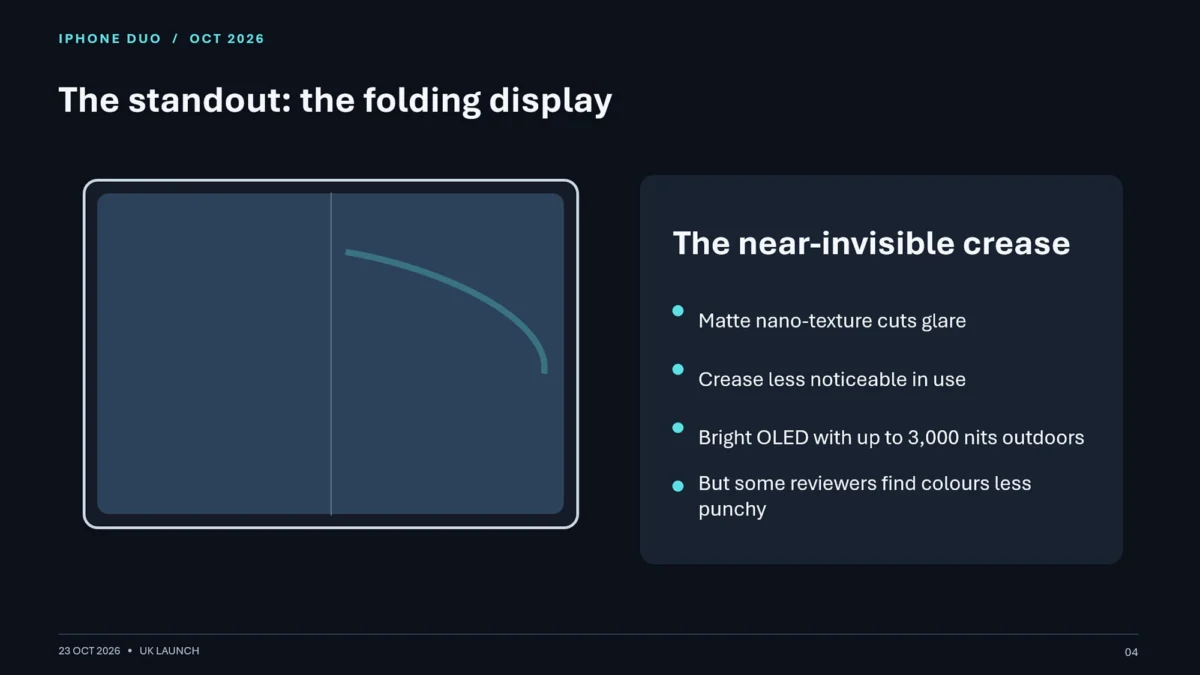
The output generated on a Plus account delivered a reasonably competent slideshow centered on Apple’s foldable device. The information retrieved was accurate, arranged across a simple, straightforward series of layouts. Visually, the result resembled what a professional might quickly pull together from a basic template when pressed for time—functional, though lacking precise alignment on bullet points and granular selectivity regarding which details deserved emphasis. Notably, the model successfully integrated an official product photograph of the iPhone Duo onto the opening slide, though it required an explicit, manual prompt to do so.
Users working within these lower tiers can request modifications by typing further instructions into the general prompt box, though they lack the ability to click on and manipulate individual slide elements directly. For professionals who only occasionally need to convert chat transcripts into rough, ready-to-use slide decks, the standard free and Plus tiers remain more than adequate, removing any urgent financial incentive to upgrade immediately.
ChatGPT Slides is a decent upgrade
Transitioning to the Pro tier unlocks the dedicated ChatGPT Slides environment, shifting the user experience away from a chat-bound export tool into a specialized workspace. Within this interface, users can open a blank presentation from scratch, utilizing basic text and image controls alongside prompt-driven generation. Structurally, the environment functions similarly to a simplified version of Google Slides integrated with a conversational command box.

Building a presentation through this method can occasionally feel tedious. Typing out intended points and waiting for the AI to render them lacks the intuitive fluidity of dragging and dropping graphics or text manually in a program like PowerPoint. During initial testing phases, the tool also exhibited moments of software instability, with certain multi-step requests failing to complete seamlessly.
Despite these growing pains, initiating a standard conversational thread and subsequently instructing the system to translate that comprehensive chat history into a slide deck yielded significantly superior results. The resulting iPhone Duo presentation on the Pro tier was considerably more expansive, logically structured, and informative than its Plus-tier counterpart, complete with functional battery life charts and official media assets.
ChatGPT presentations are still lacking at every tier
Despite the architectural differences across free, Plus, and Pro iterations, the resulting presentations consistently struggle with a fundamental lack of narrative cohesion. The output across individual slides and the deck as a whole often feels rigid, bearing the unmistakable hallmark of an algorithmic sorting process rather than human editorial judgment regarding pacing, emphasis, and visual flow.

Regardless of whether presentations are generated within a standard chat window or inside the dedicated ChatGPT Slides space, users retain the ability to select individual layout elements to perform basic manual resizing and repositioning. Furthermore, targeted conversational commands can be issued to modify specific elements, such as requesting the inclusion of an illustrative image, centering text blocks, or adjusting the visual tone.
ChatGPT Slides also incorporates collaborative features designed for enterprise teams heavily embedded within the OpenAI software ecosystem. For organizations needing to rapidly aggregate large volumes of raw information into a presentable, baseline format, the utility is evident.
Even so, traditional presentation workflows continue to hold distinct advantages. Established software platforms offer superior precision, granular control over visual elements, and sophisticated design templates that allow creators to balance aesthetic appeal with critical data points without sacrificing oversight.

How ChatGPT Slides compares to Google Slides in Google AI Pro
Google maintains a powerful presence in the AI productivity space through Gemini integration. Subscribers to the Google AI Pro tier, priced at $19.99 a month, gain direct access to Gemini natively within Google Slides to assist with deck creation. Running the same benchmark task through Gemini—requesting a comprehensive slide deck on the iPhone Duo—highlights stark philosophical differences in how the two tech giants approach AI assistance.
Unlike OpenAI’s model, Gemini actively initiates a collaborative dialogue by asking clarifying questions before generating content. It queries the user regarding the desired visual style, the target audience for the presentation, and the specific data points that require emphasis. While users can theoretically provide this context preemptively in a ChatGPT prompt, Gemini’s interactive inquiry model serves as a notably helpful addition to the workflow.
The resulting slide deck produced by Gemini and Google Slides impressed testers with its overall layout sophistication and aesthetic rhythm. The visual hierarchy, color palette selection, and information prioritization felt substantially closer to human-crafted design work than the outputs generated by ChatGPT.

However, Google’s platform was not without technical flaws. The presentation contained factual inaccuracies regarding the maximum screen brightness specifications of the iPhone Duo. Furthermore, when tasked with generating illustrative graphics, the tool produced a bizarre visual artifact depicting two older iPhone models from 2021 fused together, whereas ChatGPT Slides successfully retrieved authentic promotional imagery directly from Apple’s official web properties.
From an editing perspective, Google Slides does not currently support localized, element-specific prompt editing in the same manner as ChatGPT Slides, requiring users to channel all modification requests through a centralized command box. Nevertheless, because Google Slides is a mature, battle-tested presentation environment with a decade of software refinement behind it, its structural foundation remains remarkably robust.
Given its lower price point, mature feature set, and polished output quality, the Gemini-infused Google Slides ecosystem currently stands as the more reliable choice for users seeking AI-driven presentation assistance. While OpenAI’s rapid development pace suggests it will continue to close the gap, ChatGPT Slides currently functions more as a convenient perk for existing high-tier subscribers rather than a compelling enough catalyst to prompt a widespread migration away from established office suites.