For years, millions of e-reader users have looked on with a mixture of envy and amusement as alternative platforms embraced wireless page-turning remotes. While competitors like Kobo and Boox actively incorporated Bluetooth accessories popularized by social media platforms like BookTok, Amazon’s industry-standard Kindle line remained strictly isolated. Although modern Kindle hardware has included Bluetooth capabilities for years to support wireless headphones, Amazon kept its underlying protocols firmly locked down.
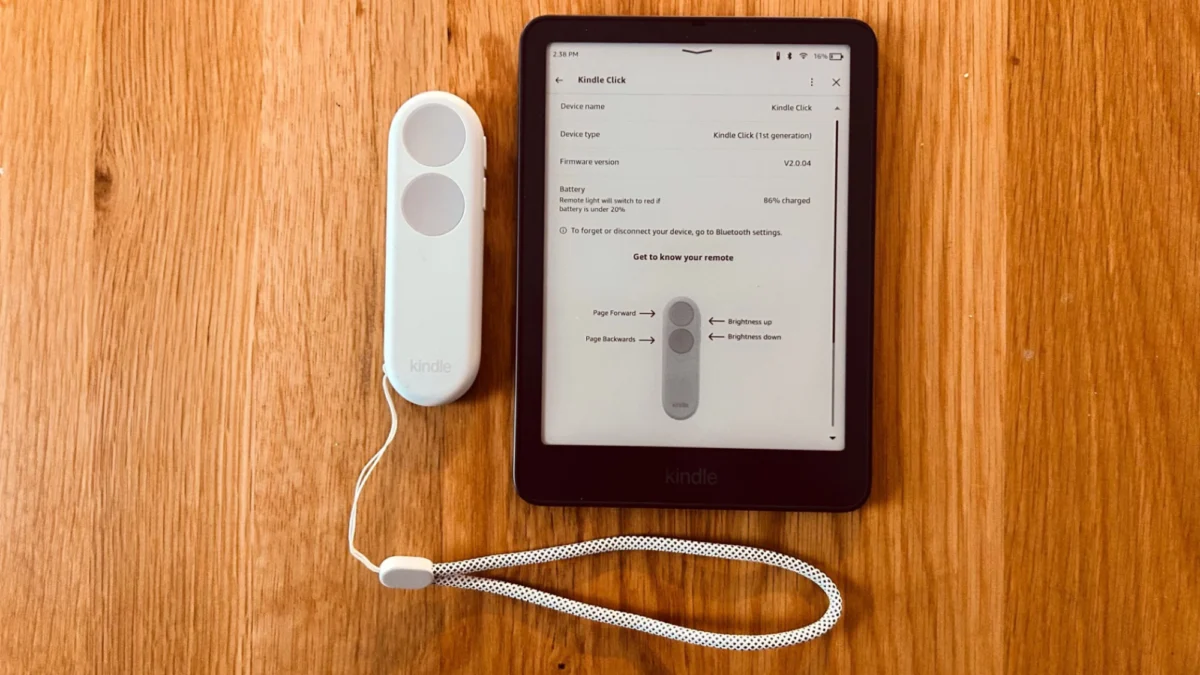
That era of restriction has officially ended. Amazon has released its first-ever official Bluetooth remote control for its e-reader ecosystem, dubbed the Kindle Click. Alongside the hardware release, the company has updated its device firmware to open up Bluetooth connectivity for the accessory, though the new capability is currently limited to Kindle models manufactured in 2024 or later.
The launch represents a significant shift for a company that has traditionally dominated the market through hardware ubiquity rather than rapid feature innovation. While Amazon deserves substantial credit for bringing e-books into the mainstream and maintaining a high-tier reading experience via deep integration into its retail ecosystem, the company has historically been conservative with new features. Competitors routinely test and adopt innovations such as temperature-adjustable lighting and color electronic paper displays long before Amazon implements them. Furthermore, the company has often maintained tight control over third-party hardware integration, leaving Kindle owners reliant on clumsy workarounds.
Prior to the introduction of the Kindle Click, Kindle users hoping to remotely turn pages faced limited and frustrating choices. Because the device’s internal Bluetooth protocol would only connect to wireless headphones, remote reading was largely out of reach. Some readers turned to third-party clip-on accessories that physically attached to the bezel of the e-reader, utilizing a mechanical arm that would tap the screen whenever a remote button was pressed. These clip-on devices, while functional, presented clear drawbacks: they could only advance pages in a single direction, obstructed portions of the text, and added unnecessary bulk to otherwise sleek hardware.

With the arrival of the Kindle Click, which retails for approximately $35 plus tax, Amazon has validated a niche market that has expanded steadily over the past several years. The accessory aligns closely with the debut of updated hardware lines, such as the new Kindle Paperwhite Signature Edition. However, compatibility remains a notable caveat for existing users. The firmware update enabling the Kindle Click and other Bluetooth page-turners will only function on devices released in 2024 or later, meaning owners of older hardware generations will miss out on the official integration unless they upgrade their devices.
What’s the point of a page-turn remote for an e-reader?
For readers who have never experienced an e-reader remote, the appeal might initially seem negligible. Skeptics often question the necessity of introducing an extra electronic device into a reading routine when simply tapping the screen or pressing a physical page-turn button requires so little effort. Yet, for specific use cases and environments, a remote control solves practical physical challenges that standard e-reader handling cannot address.
The most prominent practical application involves exercise. Holding and operating an e-reader can be awkward and distracting during physical workouts, particularly on equipment like stationary ellipticals where upper body movement is constant. Attempting to read a few chapters while navigating a spin bike can cause text to bounce around uncontrollably. By securing the e-reader onto a machine’s handlebars or placing it on a stable surface nearby, a remote control allows users to advance their reading seamlessly without interrupting their physical routine.
Beyond fitness applications, the accessory caters heavily to comfort and ergonomics. Winter reading, often associated with heavy blankets and cold environments, presents a unique logistical hurdle for book enthusiasts. Maintaining maximum coziness often involves keeping arms completely tucked away from the cold air. Having to constantly slide arms out from beneath a heavy throw just to turn a page can disrupt the comfort of an extended reading session. A remote control allows the e-reader to be positioned at an optimal viewing distance while hands remain comfortably insulated, a convenience that many dedicated readers find worth paying for.
The Kindle Click does as advertised
Priced around $35, the Kindle Click commands a modest premium over some third-party alternatives, sitting roughly $5 higher than popular competing options like the Boox Tappy. While the recent firmware update theoretically opens the door for cheaper, generic Bluetooth page-turners to interface with modern Kindles, official accessories provide a guaranteed level of native support and reliable performance.

Setting up the Kindle Click is a straightforward process. Users initiate pairing mode by pressing and holding a specific button on the remote. Navigating to the Settings menu on a compatible 2024 or later Kindle reveals an Accessories option, which may require a brief software update to appear. Selecting the Kindle Click from the discovered devices list establishes the connection. Once initially paired, the remote automatically reconnects whenever both devices are powered on, nearby, and equipped with active Bluetooth functionality, eliminating the need for repetitive manual pairing procedures.
Once connected within an open book, the device functions precisely as expected. The primary layout features two large grey buttons that can be custom-mapped to move pages either forward or backward depending on user preference. Additionally, smaller volume-like buttons situated along the side of the remote allow readers to adjust the brightness level of the front-facing light dynamically. Navigation is intentionally restricted; the remote cannot be used to browse the home screen, access device menus, or switch between different titles, requiring readers to select their material before settling into their reading environment.
The Click is not as versatile as it could be
Despite delivering reliable core functionality, the Kindle Click arrives with a somewhat limited feature set that leaves room for future software refinement. Competitors in the e-reader space have often engineered their peripherals with expanded capabilities. For instance, alternative remotes can toggle between modes to accommodate different media types, allowing users to scroll through web browser pages or skip forward and backward through audiobook tracks.
Although the Kindle ecosystem does not support web browsing, it heavily supports audiobooks via Audible integration. The inability to use the Kindle Click to control audio playback, adjust listening volume, or jump between chapters represents a notable omission for users who alternate between reading text and listening to audio.
Similarly, while the inclusion of front-light brightness controls via the side buttons is a welcome addition, the remote lacks the ability to adjust screen warmth settings. Incorporating color temperature adjustments—either through dedicated mode-switching or preset button combinations—would significantly enhance the accessory’s utility for night-time readers. While the engineering complexities of expanding these features remain internal to Amazon, the company possesses the resources to refine its hardware ecosystem further as user feedback continues to shape the evolution of modern e-reading accessories.