As generative artificial intelligence tools reshape how users discover information online, digital marketers and website owners are uncovering a surprising trend: traffic originating from ChatGPT is often significantly more engaging than traditional organic search traffic, even if the overall volume remains relatively modest.
While these referral visits might barely register in a standard Google Analytics 4 overview compared to the massive pools of visitors arriving from traditional search engines, an analysis of client sites optimized for AI answers reveals a distinct qualitative difference. Visitors arriving via ChatGPT referrals tend to stay longer, explore deeper, and demonstrate higher intent. This shift is prompting digital strategists to rethink how they evaluate web traffic quality in an era where AI-driven conversational search is rapidly gaining mainstream adoption.

Though comprehensive industry studies examining why ChatGPT traffic performs so effectively are still lacking, early observations from the field point to the unique nature of conversational discovery. When a user interacts with a generative AI tool, they are typically engaged in a multi-turn dialogue designed to solve a very specific, highly contextualized problem. By the time the AI cites an external source and provides a link, the user has already narrowed down their precise need. Consequently, the click-through is not a speculative browse born from a broad keyword query, but a targeted action taken by a user who has already been guided directly to a potential solution.
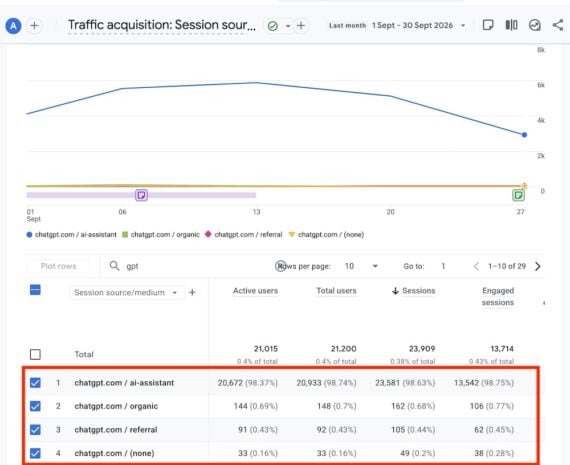
This behavioral shift presents a unique challenge for digital measurement, because the true footprint of AI-generated referrals is often obscured by standard web analytics configurations. In Google Analytics 4, tracking ChatGPT referrals requires a deliberate approach, as the raw data does not always present itself neatly within default acquisition reports.
Track ChatGPT Referrals
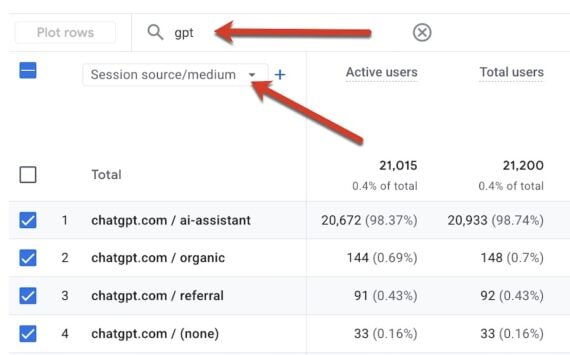
To properly evaluate this emerging traffic stream, marketers must look beyond surface-level metrics. In Google Analytics 4, navigating through the standard traffic acquisition reports provides a baseline, but because generative AI referrers operate differently than traditional search engine bots or social media platforms, default views frequently bundle them into broader categories or overlook them entirely if the sample size is small.
To gain clarity, digital analysts often turn to custom reporting methods that isolate specific referral strings. However, a significant complication arises from the technical architecture of how external links are handled by conversational interfaces. ChatGPT and similar generative platforms frequently append a "noreferrer" attribute to external links passing out of their chat environments. This attribute is primarily implemented for user privacy reasons, preventing the destination website from seeing the specific user path or granular referral parameters that preceded the click.
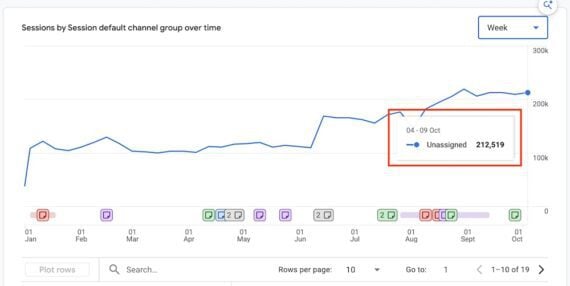
As a direct consequence of this privacy mechanism, Google Analytics 4 frequently misclassifies a substantial percentage of incoming ChatGPT traffic. Instead of attributing the visit to an AI referrer, analytics platforms often dump this traffic into the "Direct" or "Unassigned" channels. For many digital properties heavily cited by conversational models, this unassigned traffic channel is showing steady, measurable growth, masking the true origin of highly engaged visitors behind anonymous reporting labels.
Analyze ChatGPT Referrals
Because ChatGPT does not disclose actual user prompts to destination websites, tracking down the exact catalyst for a referral requires a degree of analytical detective work. Analysts cannot simply open a search console report to view the exact keyword phrases typed by the user. Instead, the process relies on examining the landing pages where these users eventually arrive.

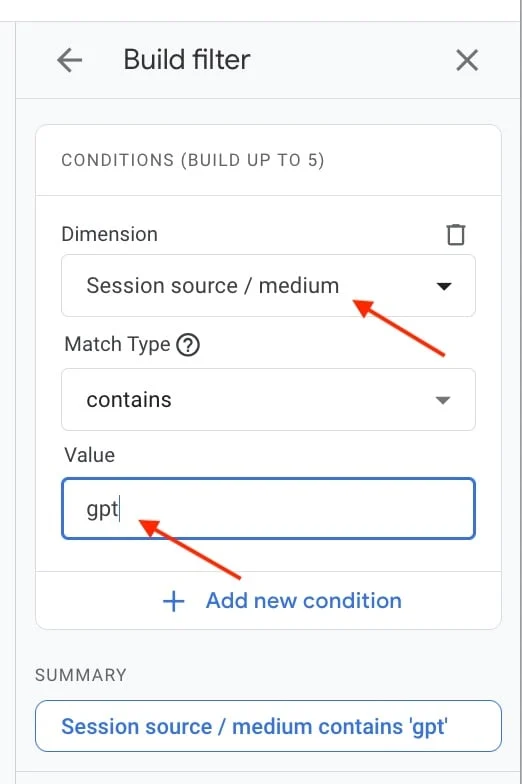
Because each landing page on a website typically serves to address a distinct problem or answer a specific query, digital strategists can deduce the nature of the missing prompt by looking at the content that successfully solved the user’s dilemma. By building custom filters within Google Analytics 4—such as isolating traffic sources that contain variations of the term "gpt"—marketers can filter and sort landing pages by the highest volume of clicks arriving from AI interactions.
This filtered view helps identify the exact content assets that generative AI models are actively citing to resolve user inquiries. Once those high-performing landing pages are identified, strategists can reverse-engineer the relationship by querying the AI model directly. By presenting the URL to ChatGPT and asking what contextual prompts would typically trigger the model to cite that specific page as a solution, web managers can gain valuable insight into the semantic language and user intent driving the traffic.
Furthermore, investigating these cited pages across additional digital marketing and search visibility tools allows professionals to cross-reference traditional rankings with AI citation patterns. As generative tools continue to evolve and integrate deeper into daily web browsing habits, monitoring and properly categorizing these elusive AI referrals remains an essential task for understanding modern digital engagement.