By Chris Vasquez | June 24, 2026
The strategic placement of a signup form on a webpage can profoundly influence audience conversion rates, fundamentally altering who decides to fill it out and engage further with a brand. Digital marketers have long understood that an inline form embedded directly within core content captures the attention of a reader who is already deeply engaged, reading mid-article, and intellectually invested in the subject matter. Conversely, traditional placement methods like sidebars typically cater to casual visitors who are merely scanning the page. Recognizing the nuances of user behavior and website architecture, email marketing platform AWeber has announced a significant update to its technology suite, introducing visual inline form placement capabilities to its existing AI-powered toolset.
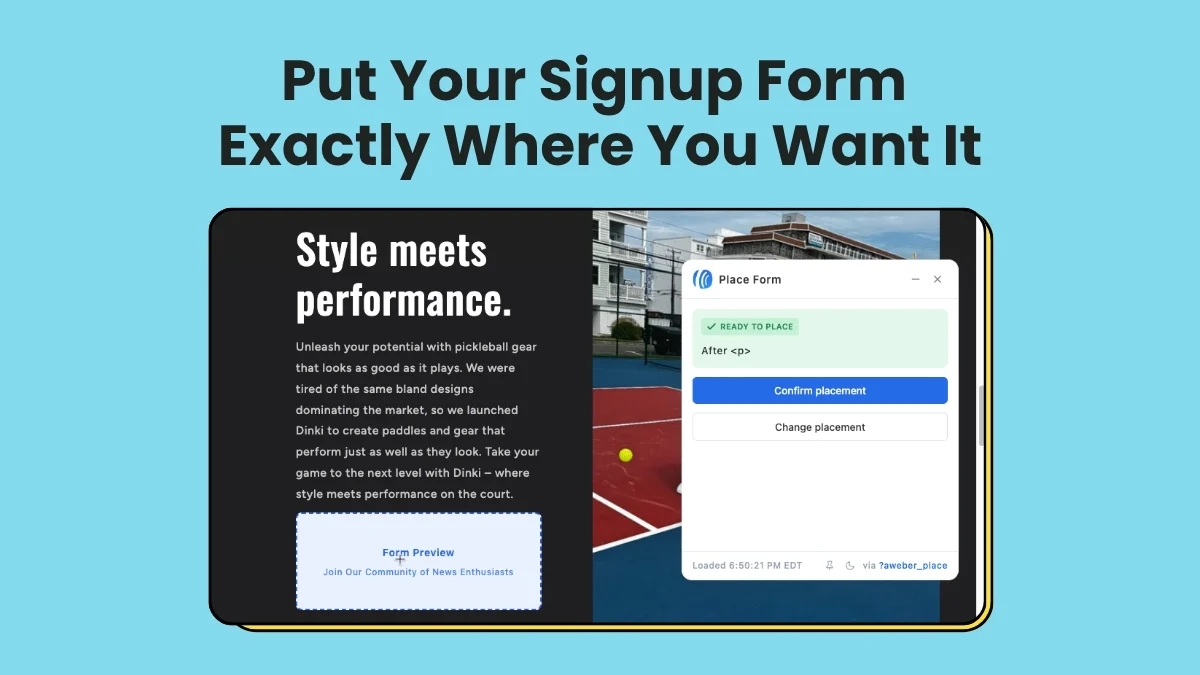
AWeber’s AI Signup Form Builder now enables digital creators and business owners to create inline forms and position them directly onto their live websites through a visual interface. By simply navigating to the desired spot on a live webpage, confirming the selection, and deploying the asset, administrators can integrate new conversion points without writing a single line of code. This development aims to bridge the gap between sophisticated web design and accessible marketing automation, allowing publishers to capitalize on reader attention precisely where it occurs within the natural flow of digital content.
The introduction of this feature addresses a longstanding friction point in digital publishing and website management. Historically, embedding custom signup forms required navigating complex HTML and CSS files, coordinating with web developers, or relying on rigid templates that failed to blend seamlessly with a site’s unique aesthetic and layout. The new capabilities within the AWeber toolset seek to eliminate these technical barriers, offering a streamlined approach that prioritizes visual confirmation over abstract coding.
Create your inline form in seconds
To accommodate diverse user workflows and preferences, the system provides three distinct starting points for form creation. The first method involves a custom prompt, where users can describe their vision in plain language, specifying that the asset is intended to function as an inline form for their website. The second option utilizes a fill-in-the-blanks format, guiding creators through a series of straightforward prompts where they can select the direct website embedding option as their preferred form type. The third avenue gives users access to a comprehensive template gallery, allowing them to browse pre-designed layouts and choose any inline template as a foundation for their project.
Regardless of which starting point a user selects, the configuration process begins within a unified form editor. Here, administrators retain complete control over the copy, design elements, and underlying settings, ensuring that the visual presentation aligns with their brand guidelines before any deployment takes place. This preparatory phase is crucial for maintaining brand consistency and optimizing the messaging that readers encounter during their site visit.
Place it with four clicks
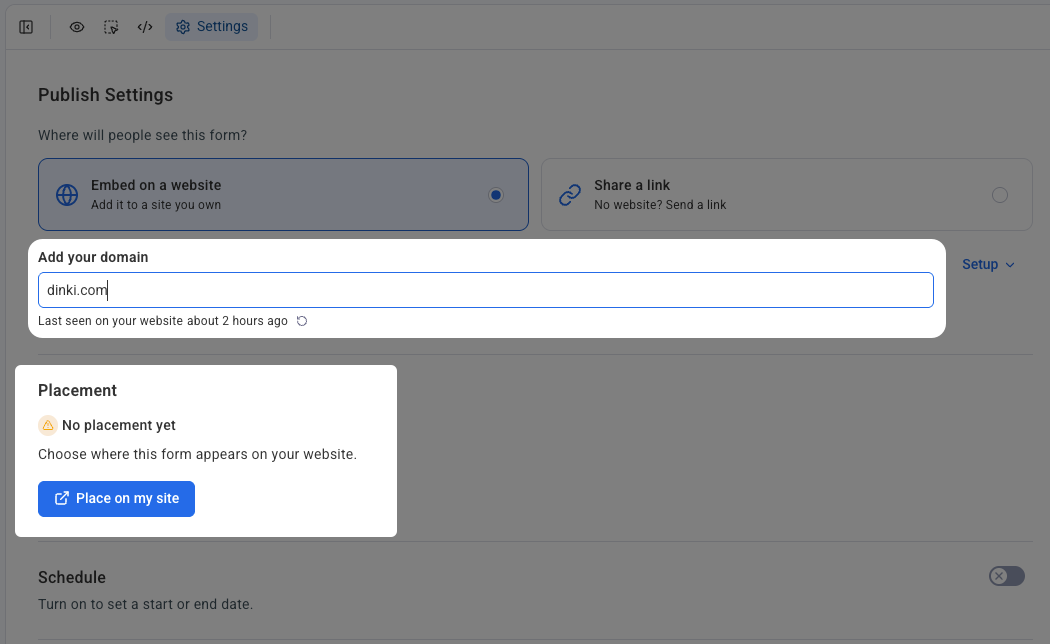
Once the design and messaging of the form are finalized, the deployment process has been engineered to require just four straightforward actions. The procedure begins by accessing the settings tab located within the form editor interface. From there, users designate the specific domain where they want the form to appear and verify that the necessary signup form snippet has been properly installed on their website.
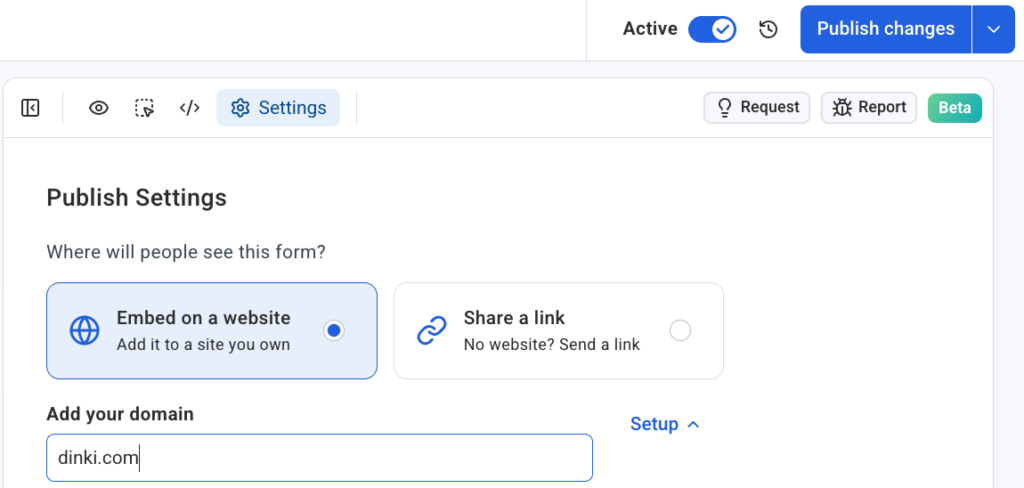
The third action involves selecting a command to place the form directly onto the site. At this stage, the user’s live website opens within the interface, featuring an active placement widget rather than a generalized wireframe or a simulated preview. This allows administrators to click on a real location on their actual pages. Once the desired section is selected, the user simply clicks a confirmation button, instantly rendering the form live on the page.
This visual methodology represents a shift away from abstract identifiers and backend configuration screens, providing a tactile experience that lets publishers see precisely how the form interacts with surrounding paragraphs, images, and layout elements before finalizing the change.
Works on self-hosted sites
Compatibility remains a vital consideration for digital publishers managing diverse technology stacks. The updated form builder is designed to integrate smoothly with a wide array of self-hosted content management systems and website builders, including WordPress, Shopify, Wix, Squarespace, and Lovable, among others.
Each domain connects independently through the platform’s settings menu, ensuring that multi-site operators and agency professionals managing various client accounts can maintain strict organization. By linking specific forms to designated domains, administrators can oversee complex digital portfolios without risking cross-property confusion or misallocated assets. This architectural flexibility ensures that businesses operating across different platforms can leverage the same intuitive deployment process regardless of their underlying technical infrastructure.
Put your form where your readers already are
The overarching philosophy behind the update centers on reducing the friction between content consumption and audience acquisition. Publishing valuable content naturally drives traffic, but converting that incoming attention into a loyal subscriber base has often required redirecting users to separate landing pages or hoping they notice static elements like sidebars or footers.
By enabling seamless inline integration, the updated tool aims to capture reader interest at its peak, embedding conversion opportunities directly into the reading experience. As digital marketers continually seek more efficient ways to grow their audiences without disrupting the user experience, tools that offer visual, code-free deployment directly on live sites represent a notable evolution in how websites convert casual visitors into long-term subscribers.