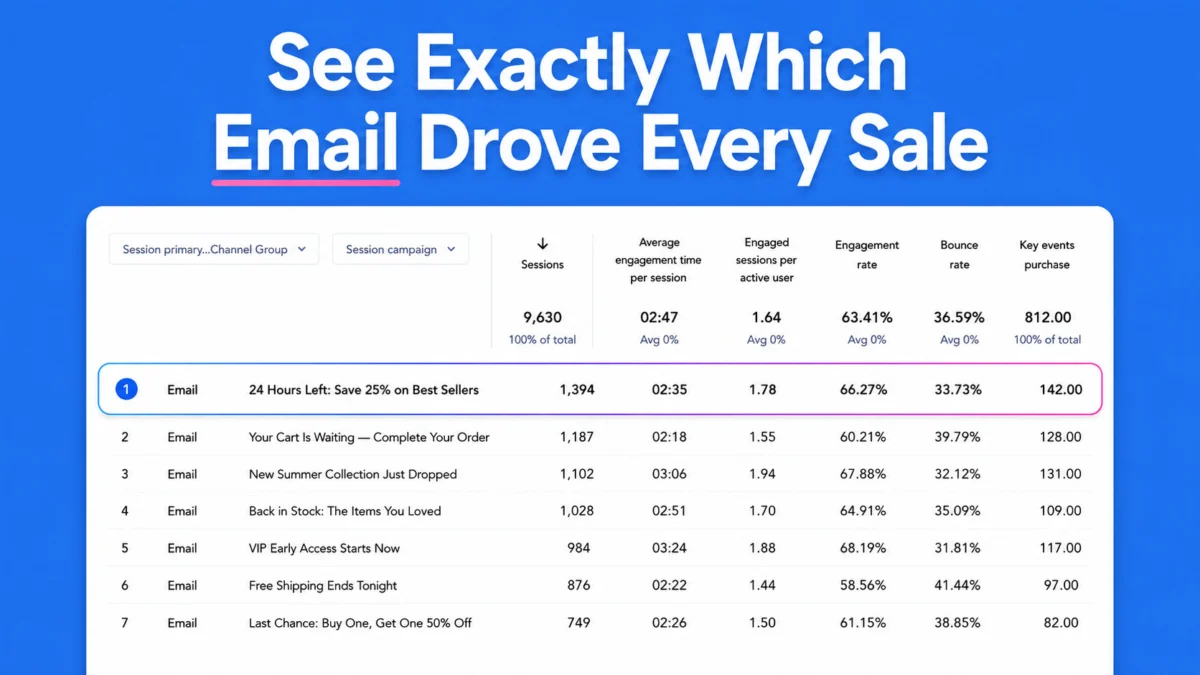
Marketers and business owners seeking a clearer line of sight between their email outreach and final website conversions now have a streamlined solution. AWeber has rolled out an automated feature designed to eliminate the tedious manual labor traditionally required to track campaign success, allowing users to trace a sale directly back to the exact subject line that inspired it.
Announced by Dave Stys, the new functionality automatically appends UTM parameters to every link embedded within an email message at the exact moment of transmission. Rather than forcing creators to spend time constructing individual tracking links or managing complex spreadsheets, the platform handles the technical setup behind the scenes. Once a broadcast goes live, campaign data is immediately populated and waiting for review inside Google Analytics, removing friction from the analytical workflow and opening up new avenues for performance optimization.
Every Link Gets Tagged Automatically
The core mechanic of the system relies on precision timing and automation. At the precise moment an email is dispatched, AWeber automatically weaves three essential UTM parameters into every hyperlink included in the content.
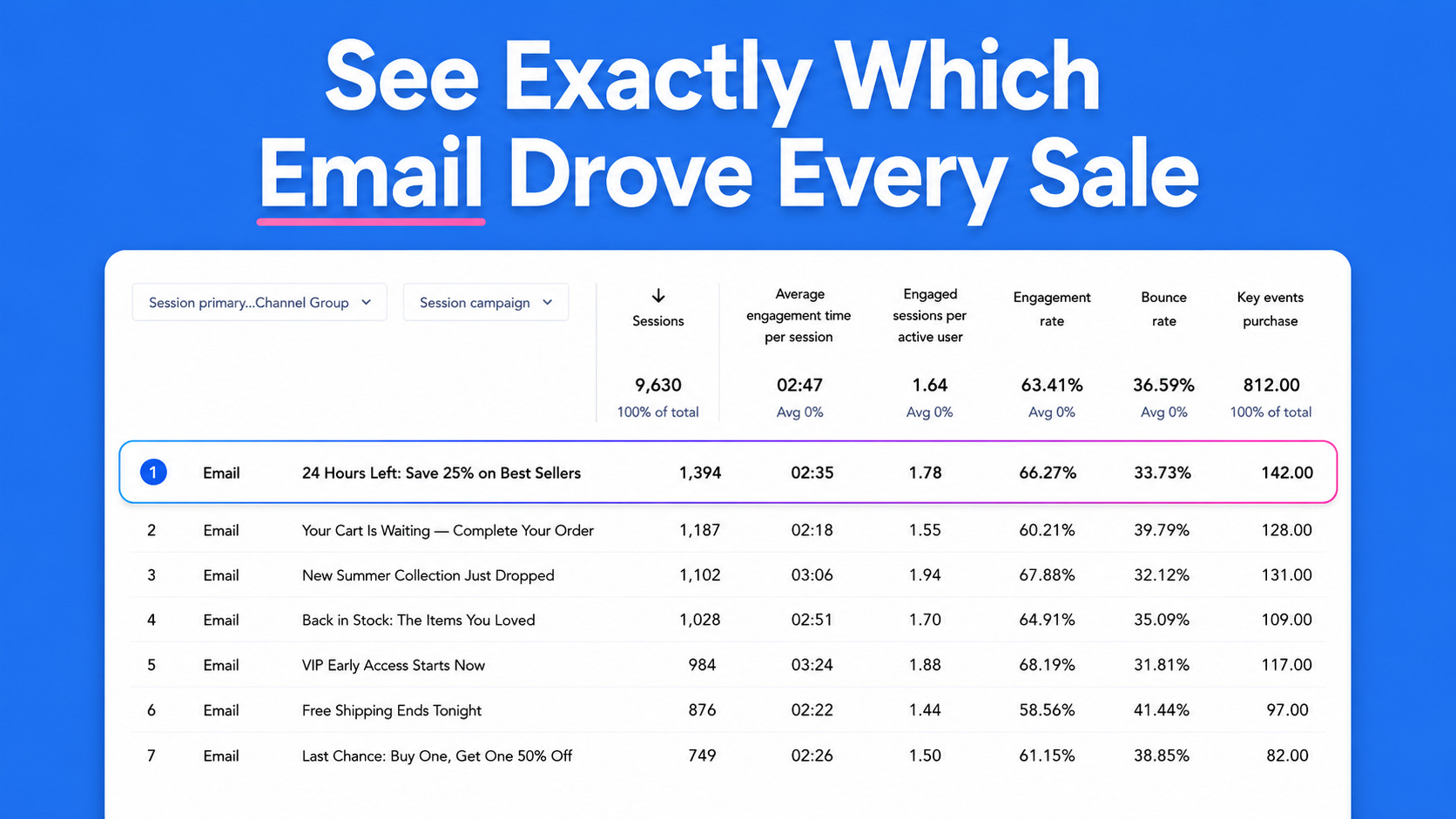
Rather than treating every link with a generic identifier, the system leverages the email’s subject line to create a unique campaign label inside Google Analytics. This deliberate design choice empowers marketers to evaluate and compare performance metrics across disparate sends without ever needing to manually touch or modify a single URL. By automating this foundational layer of tracking, the platform ensures consistency across large volumes of outbound messaging, significantly reducing human error and freeing up marketing teams to focus on strategy and copywriting rather than data hygiene.
Already Adding Your Own Parameters? Yours Stay Put
For advanced marketers who have long relied on their own customized tracking infrastructures, the introduction of automated tagging raises legitimate questions regarding compatibility and potential overrides. Addressing this concern proactively, AWeber has engineered the system with intelligent detection capabilities designed to respect existing workflows.
When the platform processes an outgoing message, it scans for pre-existing UTM parameters. If it discovers that a link has already been custom-tagged with specific campaign values, the system steps back and leaves those parameters entirely untouched. This safeguard ensures that highly specialized tracking schemas, proprietary attribution models, and custom data architectures remain completely intact, allowing users to benefit from automated efficiency on standard links while maintaining total control over their bespoke tracking assets.
See Which Emails Actually Move People to Buy
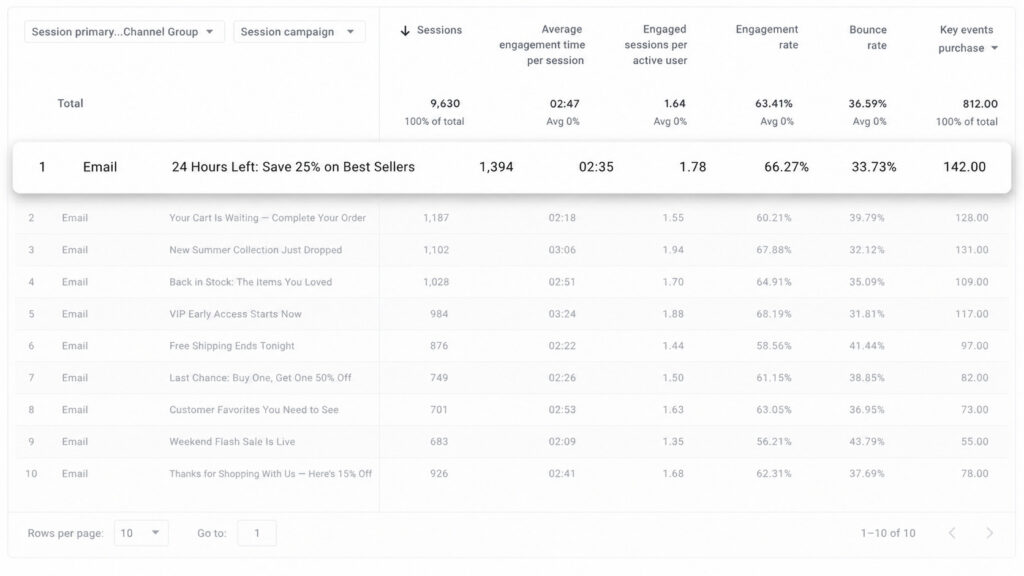
The true value of any marketing analytics enhancement lies in its ability to generate actionable insights, and this new feature is engineered to provide unprecedented clarity regarding subscriber behavior. By bridging the gap between inbox engagement and website conversion, marketers can now move beyond vanity metrics like open and click-through rates to examine bottom-line impact.
To leverage the incoming data, users can navigate to Google Analytics, access the acquisition reporting dashboards, and filter their views by the specific source and medium parameters established by the integration. Because each individual email broadcast registers as its own distinct campaign, reviewing historical performance becomes a straightforward analytical exercise. Creators can pull reports from their last several sends to instantly distinguish between messages that merely drive transient traffic, those that successfully generate meaningful conversions, and those that fail to resonate with the audience.
Turn It On or Off From Your List Settings
While the feature is configured to operate automatically by default for every active AWeber account, the platform provides flexible administrative controls for users who prefer customized operational environments. The tracking functionality can be managed directly through the list settings interface, allowing administrators to adjust preferences according to specific campaign requirements.
Changes made within the administrative settings take effect immediately upon the dispatch of the next scheduled broadcast. This administrative flexibility ensures that whether an organization wants comprehensive, hands-off tracking across all communications or prefers a more selective approach for targeted client segments, the platform adapts smoothly to established operational procedures without requiring external plugins or complicated integrations.