In the modern Salesforce environment, technical debt often manifests in the most unassuming ways. Consider a common scenario: an administrator attempts to delete an unused field on an Account object, only to be blocked by a reference in an obsolete flow version created eighteen months ago—a legacy component that no one on the current team remembers building. In an organization with hundreds of flows and thousands of accumulated versions, manually auditing and deleting these remnants ceases to be a simple task; it becomes a recurring administrative tax, slowing down every cleanup, refactor, and deployment project.
To address this systemic issue at scale, a new open-source tool, the Flow Version Cleaner, has been developed to help organizations prune obsolete flow versions safely. By leveraging the Salesforce Tooling API, this utility automates the identification and removal of stale metadata. However, what began as a modest weekend project quickly evolved into a complex study of the Tooling API’s behavior. The project revealed that real-world implementation often requires navigating far beyond the "happy path" of standard documentation. The lessons learned during this development process—ranging from identifying fragile runtime assumptions to maintaining state across asynchronous executions—offer a blueprint for architects and developers looking to manage destructive operations within Salesforce with greater confidence.
Defining Requirements Before Designing
The architecture of the Flow Version Cleaner was built upon three fundamental requirements. The primary goal was to establish a clear retention policy that prevents the accidental deletion of critical, albeit older, components. As the project progressed, it became evident that simply looking at version numbers was insufficient for determining what was "safe" to remove. The development process became an iterative exercise in defining what constitutes a truly obsolete version.
To visualize how these requirements function in practice, consider a flow with seventeen existing versions. If version fourteen is currently active and the retention rule is set to keep two inactive versions, the tool must be intelligent enough to preserve versions fifteen through seventeen—as these are newer than the active version—and versions twelve and thirteen, which serve as the most recent inactive history. Consequently, only versions one through eleven are flagged for deletion. This nuance highlights the necessity of robust logic when designing automated cleanup scripts, as a simplistic approach could inadvertently destroy valuable deployment history.

Selecting the Correct API Architecture
Before a single line of code was written, a critical evaluation of available interfaces was necessary. The project required a tool capable of querying metadata definitions and executing independent deletions at runtime. Evaluating the Apex Metadata namespace, the Metadata API, and the Tooling API revealed distinct advantages and limitations for each.
The Apex Metadata namespace, while useful for specific record types, proved inadequate because it cannot delete flow versions. The Metadata API, which utilizes a destructive changes manifest, presents a different hurdle: the manifest must be generated prior to deployment. Because the tool cannot determine its targets until it has queried the individual definitions and applied the complex retention rules, the Metadata API’s requirement for pre-defined manifests makes it a poor fit for dynamic, runtime cleanup. Furthermore, the Metadata API is prone to total deployment rollbacks if an error occurs, meaning a single flow version owned by a managed package could derail an entire cleanup operation.
The Tooling API, conversely, treats each flow version as an individual resource, allowing for granular DELETE calls. While this requires the overhead of managing HTTP callouts, it provides the precise, queryable access necessary to build a list of targets at runtime and execute deletions independently. If one deletion fails, the rest of the job can continue, providing the resiliency required for enterprise-scale metadata management.
Designing Authentication and Authorization
Authentication represents a foundational architectural decision, not merely a configuration task. An initial, tempting shortcut involves using the running user’s session ID in the Authorization header. However, this approach is flawed; it ties the tool’s permissions to the user who happens to trigger the job, and a session ID can return null during asynchronous processing. A tool designed for destructive metadata operations should operate under its own dedicated credentialing to ensure consistency and security.

The transition from synchronous testing to asynchronous execution underscored this reality. By implementing Named Credentials, the developer was able to separate the endpoint and authentication parameters from the Apex code, allowing the Salesforce platform to manage the callout security. Furthermore, successful authentication does not guarantee authorization for every sub-task. The identity used by the tool must possess specific permissions to interact with related components, such as flow interviews. This broader lesson suggests that authentication strategies should be validated in the actual environment where the code will execute, rather than relying solely on the results of synchronous development tests.
Mastering the API Object Model
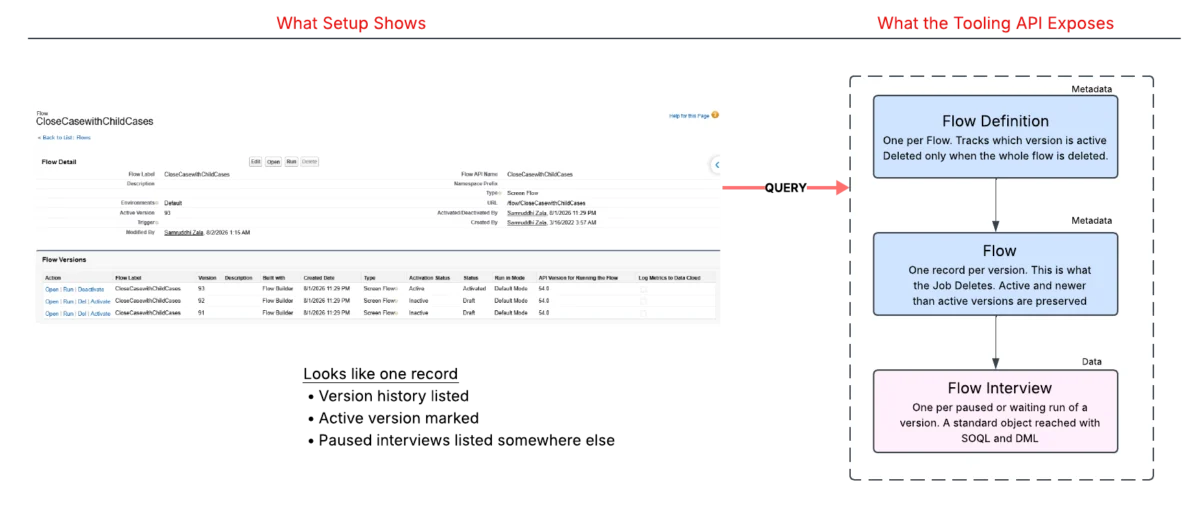
The Salesforce platform often presents a simplified view of metadata in the Setup UI that belies a more complex backend structure. The Tooling API clarifies this immediately. A single flow, as seen by an administrator, is actually comprised of three distinct components: a Flow Definition that tracks the active version; individual Flow records for each version; and Flow Interviews, which represent specific, paused, or waiting runs of a flow.
This distinction is not merely academic; it represents a bridge between metadata and data. The Flow Definition and Flow records are metadata, managed via the Tooling API, while the Flow Interview is standard data, queried via SOQL and managed through the REST API. Consequently, a single cleanup operation must span two different interfaces. This realization led to a deeper understanding of system boundary dependencies.
Navigating System Boundaries and Constraints
System boundaries are where integration challenges typically emerge. A critical hurdle in this project was the fact that the platform prevents the deletion of a flow version if active flow interviews are still attached to it. Because Apex forbids performing a DML operation followed by a callout in the same transaction, the tool could not simply delete interviews using DML and then use a callout for the metadata. The solution required using the Composite REST API to handle the deletion of interviews as a prerequisite to the Tooling API’s cleanup of the versions.

Ownership also serves as a significant constraint. Managed packages introduce protected metadata that subscriber organizations are not permitted to alter. The Tooling API strictly enforces this, meaning that any cleanup tool must be programmed to recognize and ignore managed package components to avoid triggering API errors.
Ensuring State Across Asynchronous Handoffs
Distributing work across multiple transactions introduces the risk of state loss. When a stateful batch process serializes an object graph, there is a risk that custom fields may arrive empty in subsequent batches. To mitigate this, developers must avoid trusting the platform to implicitly maintain the state of complex objects.
The Flow Version Cleaner addresses this by building an explicit payload in the initial job and reading that payload in the subsequent execution. Annotating inner classes to ensure consistent serialization, including the preservation of DateTime values, prevents the silent loss of data. Additionally, the tool uses a single snapshot of the organization’s state for both the decision-making and action phases. This ensures that the tool is not acting on stale information, providing a consistent view of the organization’s metadata at the moment of execution.
Building Safeguards into Destructive Automation
The final, and perhaps most important, lesson involves the inherent risks of destructive automation. Unlike standard records, metadata cannot be recovered from the Recycle Bin once it is purged. To combat this, the Flow Version Cleaner incorporates multiple safety layers: a configurable dry-run mode, the retention of protected versions, and comprehensive logging.

By isolating failures, the tool ensures that an issue with a single flow version does not halt the entire cleanup process. These safeguards transform the tool from a risky script into a governable asset, ensuring that every deletion is reviewable and that the organization remains in a known, stable state. For those looking to implement similar automation, the takeaway is clear: the Tooling API is a powerful tool, but it is one that must be approached with the same rigor and caution as any other external system integration. Proper modeling, clear architectural boundaries, and a "fail-safe" mindset are essential for any administrator or developer tasked with managing the long-term health of a Salesforce environment.