For years, millions of WordPress users have relied on traditional page builders to construct websites without writing code. While these legacy tools successfully made web design more accessible, they frequently came with familiar compromises, including rigid box layouts, heavy reliance on third-party plugins, bloated codebases, and performance trade-offs that could noticeably slow down a site. A new entry in the ecosystem aims to disrupt that paradigm. Kirki, recognized as the first freeform visual builder with an infinite canvas for WordPress, seeks to redefine the website creation experience by offering cleaner performance, absolute design freedom, and zero plugin dependency.
Rather than building upon the conventions of older page builders, Kirki reimagines the website creation workflow with a freeform infinite canvas, an integrated Content Management System, and a comprehensive suite of built-in features. The result is a streamlined process that provides creators with greater creative liberty while producing cleaner, faster websites. Whether a user is a designer seeking pixel-perfect control, a developer looking for leaner code output, or a business owner desiring a professional web presence without unnecessary complexity, Kirki aims to eliminate the long-standing limitations associated with WordPress page builders.

A Closer Look at Kirki
Kirki functions as a no-code visual website builder designed specifically to bridge the gaps where other page builders traditionally fall short. Unlike many competitors that require a sprawling ecosystem of add-ons, Kirki positions itself as an all-in-one solution. It provides everything necessary to build fully functional websites without relying on third-party dependencies, marking a significant departure from standard WordPress workflows. Furthermore, the platform bundles its capabilities into transparent subscription models, ensuring users are not blindsided by surprise upgrade fees for vital features.

The platform offers a robust free version available directly from the WordPress plugin directory. Far from a watered-down teaser, this free edition enables users to design modern websites on an infinite canvas without financial investment. For those looking to scale, Pro plans offer affordable pricing structures. The Starter plan provides full access to premium features for a competitive annual fee, competing directly with market alternatives that often keep critical functionalities locked behind paywalls. Additionally, a lifetime plan offers unlimited use for a single one-time payment, removing the friction of recurring renewals for agencies and long-term project managers.

Website Performance Comparison
Website performance directly impacts user experience, search engine optimization, and conversion rates. To evaluate how different builders influence underlying speeds, comparative benchmarks were established between Kirki and Elementor under identical conditions. Both builders were installed on a clean WordPress setup utilizing the default Twenty Twenty-Five theme. Identical layouts incorporating comparable design elements were constructed, and Lighthouse performance audits were subsequently executed to measure load times, responsiveness, and Core Web Vitals.

The comparative analysis revealed stark differences in technical execution. Kirki generated a noticeably cleaner Document Object Model with significantly fewer underlying division tags and zero unnecessary wrappers. This streamlined architecture translated directly into faster load times and superior scores across all audited metrics. Conversely, Elementor introduced heavily nested markup and extra background scripts even within the simplified layout, dragging down its overall performance metrics. For projects where clean code, rapid loading times, and technical efficiency are paramount, the performance audit demonstrated a clear technical advantage for Kirki.

Exploring the Core Features
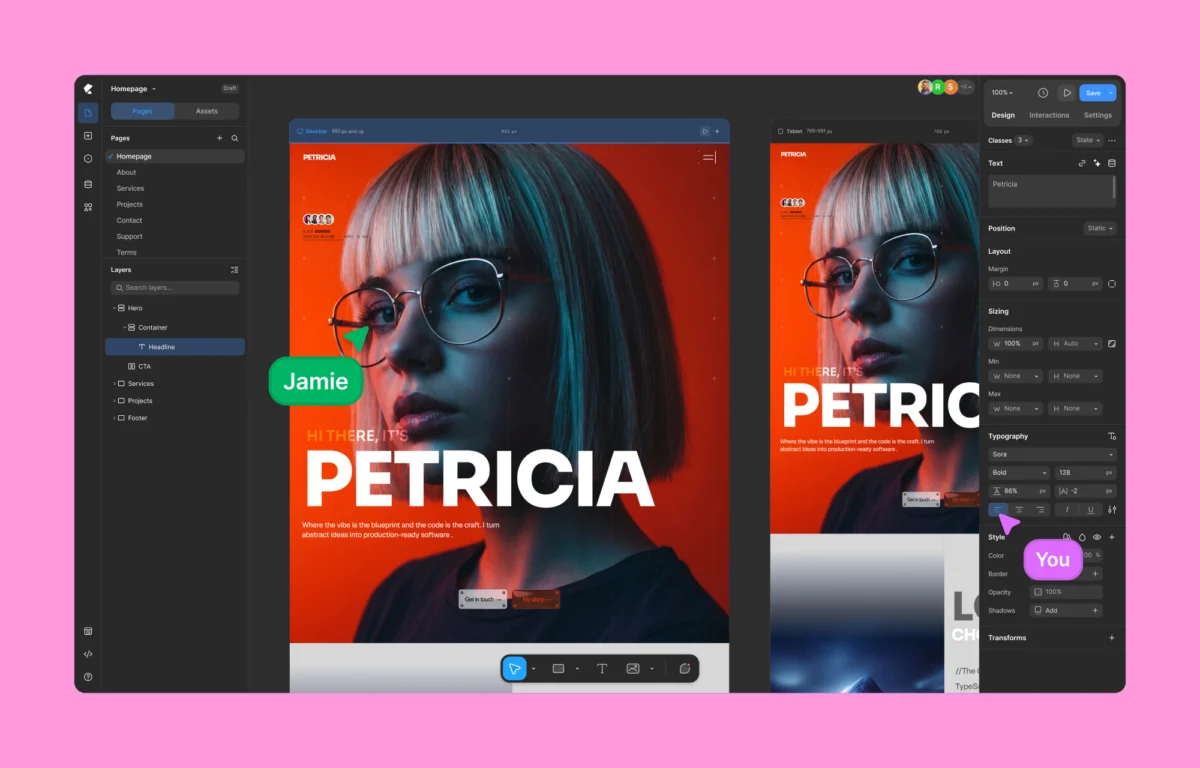
Building upon its performance foundations, Kirki incorporates a robust feature set engineered around modern design methodologies. The most striking departure from traditional builders is its infinite canvas. Users are no longer forced to place elements into rigid, predefined row-and-column structures. Instead, the infinite canvas allows creators to pan freely, zoom in and out, place elements with absolute precision, overlap sections, layer backgrounds, and orchestrate complex visual interactions entirely through the interface. The workspace supports both light and dark modes, drawing structural inspiration from modern standalone design applications like Figma and Webflow.

In tandem with the infinite canvas, Kirki introduces concurrent editing across all responsive views. Rather than forcing users to toggle back and forth between isolated desktop, tablet, and mobile preview modes, the interface displays multiple responsive views side by side simultaneously. Changes made at larger breakpoints cascade intelligently down to smaller screens, though adjustments can be made independently wherever the design requires tailored interventions. For teams transitioning designs from external software, Kirki includes a direct Figma import workflow, allowing high-fidelity layouts to be brought into the WordPress environment seamlessly while remaining fully responsive by default.

Advanced Design and Content Management
Handling dynamic content in traditional WordPress environments typically requires installing third-party tools like Advanced Custom Fields. Kirki integrates this capability natively through a built-in content manager, allowing creators to manage custom fields, dynamic templates, and data-driven layouts without writing code or relying on external plugins. This native approach extends to styling management through a class-based system that automatically saves applied styles as reusable CSS classes, bringing scalability and structural consistency to large-scale web projects.

Global CSS variables further enhance this structural control by letting administrators define site-wide design tokens for colors, typography, spacing, and sizing. While the platform operates as a visual builder, it accommodates advanced developers by permitting custom CSS injections at the class or element level, alongside custom JavaScript implementation when required. Furthermore, the platform includes a timeline-based animation editor, enabling creators to build sophisticated scroll-based effects, hover states, and typography animations broken down by individual characters or words without writing complex scripts.

Collaboration and Quality Control
Collaboration represents another major focus for the platform, introducing a multi-user co-editing environment to WordPress. Multiple team members can work within the same page simultaneously, viewing color-coded cursors and live updates as changes occur on the canvas. Integrated commenting tools allow contributors to pin notes directly to specific layout elements, streamlining feedback loops for agencies and remote design teams.

Before publication, an integrated Page Audit tool scans the site layout for technical oversights, checking for missing alternative text on images, broken links, accessibility barriers, and SEO discrepancies. This automated quality control ensures that the resulting pages remain performant, accessible, and optimized for search engines right out of the box. Supported by an expanding library of template kits, pre-designed pages, and modular layout sections, Kirki offers an integrated alternative for professionals seeking to modernize their WordPress development workflow.