For many Apple users, the native Contacts app serves as the foundational hub for all daily communication, anchoring personal connections on the iPhone and maintaining professional directories on the MacBook. While the application often appears straightforward on the surface—designed merely to store names, phone numbers, email addresses, and basic biographical notes—it houses a robust suite of advanced functionalities beneath its minimalist interface. Independent tech journalist Pranay Parab highlights that users frequently overlook these sophisticated capabilities, which range from automated duplicate management and smart lists to streamlined bulk editing and rapid contact sharing techniques.

Managing digital address books often leads to clutter, particularly when multiple entries are created over years of device upgrades and data migrations. Apple addresses this common frustration through built-in duplicate detection mechanisms. On iOS devices, the system automatically surfaces a prompt at the top of the contact list when identical phone numbers or email addresses are detected across separate profiles, allowing users to consolidate them with a single tap. A similar, more manual approach is embedded within the macOS version of the application, where users can navigate the top menu bar to uncover hidden duplicates and quickly merge or purge redundant information.
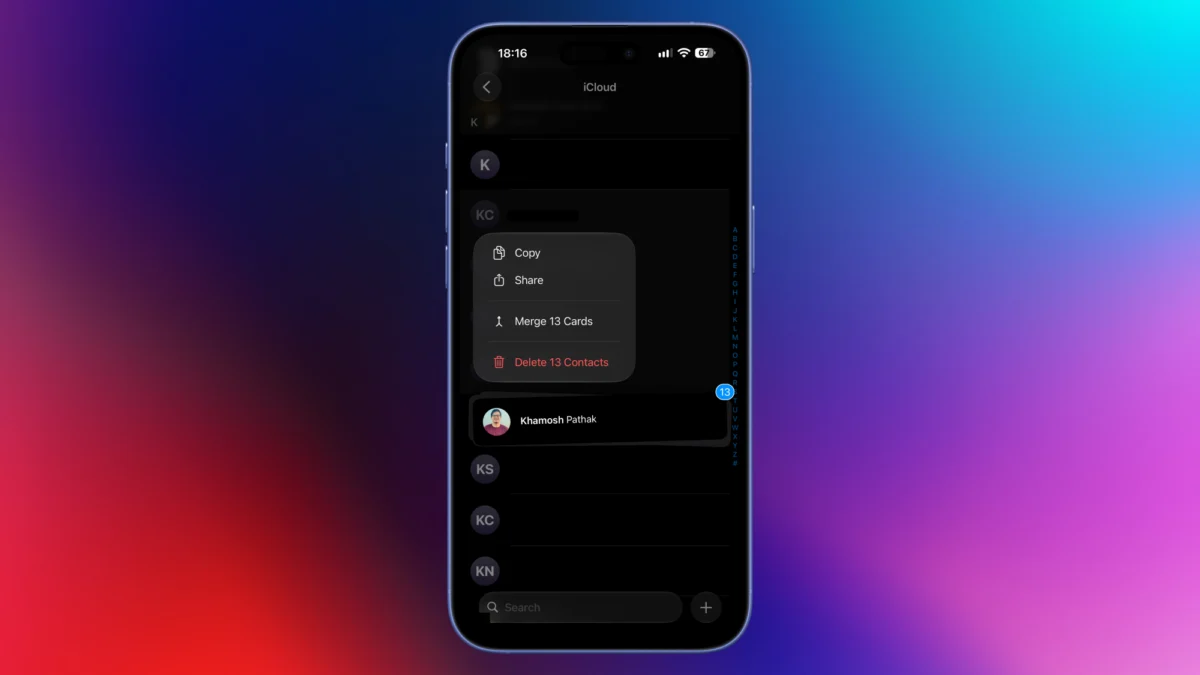
Bulk operations have historically presented a challenge on mobile platforms, where single-item management is the default paradigm. However, the macOS ecosystem permits rapid multi-selection through standard keyboard modifiers like the Shift and Ctrl keys combined with directional arrows. For iPhone and iPad users, Apple implements a specialized gesture: sweeping two fingers up or down across the contact list activates a multi-select mode. This technique allows users to aggregate large batches of entries smoothly, scrolling through the directory to accumulate additional selections before executing batch commands such as mass deletion.

Privacy considerations often complicate the sharing of digital contact cards. When sending a contact via standard iOS share sheets, the operating system prompts users to choose specific fields for transmission, preventing the inadvertent disclosure of sensitive personal data such as home addresses, private email accounts, or historical relationship notes. While this safeguards personal privacy, it introduces minor friction during rapid communication. To bypass this extra step in text-based workflows, users can copy a contact name directly from the application and paste it straight into the native Messages app. Although this shortcut remains confined to Apple’s native messaging infrastructure and does not extend to third-party platforms like WhatsApp, it offers a rapid alternative for iMessage users.
Integration with third-party communication suites represents another area where the Contacts app extends its utility. Rather than navigating separate applications to initiate conversations, users can interact directly with the call and message buttons within the native iOS contact card. Pressing and holding the messaging icon reveals a comprehensive list of compatible applications—including WhatsApp, Signal, and Telegram—permitting users to launch chats instantly, even if those platforms do not have direct access to the entire system address book. A parallel interaction applies to voice calls, where holding the call button redirects the communication channel to an alternate VoIP or messaging application linked to that specific phone number.

Streamlining contact removal is another design priority for iOS, which traditionally enforces safeguards against accidental deletions. While this protective measure prevents critical data loss, it can impede routine maintenance when purging obsolete entries. Users can expedite individual deletions by holding down a contact name to invoke a pop-up menu containing a direct removal option. When paired with the two-finger selection gesture, this pop-up menu dynamically adapts to display a batch deletion command reflecting the exact number of highlighted entries, thereby accelerating address book cleanup.
For users seeking to migrate or back up their entire directory, the macOS application provides comprehensive export utilities. By accessing the file menu, individuals can export their complete address book as a standard vCard file, facilitating seamless importation into alternative services like Google Contacts. Alternatively, the application supports direct PDF generation for physical archiving or printing purposes. Furthermore, Mac users can customize the foundational data architecture by modifying default contact templates, stripping away unused or obsolete data fields to ensure new entries remain streamlined and focused exclusively on essential phone and email parameters.

Locating recently added acquaintances whose names have slipped from memory often proves cumbersome when relying solely on alphabetical scrolling. To resolve this, the macOS Contacts application supports smart lists configured around temporal parameters. By defining criteria based on recently modified or created cards within a specific timeframe—such as the preceding ten days—users can instantly isolate recent additions, such as a newly acquired professional contact. Beyond temporal sorting, smart lists enable automated categorization, allowing users to group contacts dynamically based on shared attributes like company names or organizational affiliations.
Finally, hardware-level sharing mechanisms like NameDrop leverage proximity to exchange contact information seamlessly between supported Apple devices. Because this feature can instantly transmit comprehensive personal data when devices are brought close together, maintaining an up-to-date and curated personal contact card is essential for privacy management. Users can edit their primary contact profile within iOS to restrict the fields shared during these interactions, substituting formal headshots or clean emoji representations for casual photographs to maintain control over personal information exchanged in public environments.